Stopping the Onboarding Process

Stopping the Onboarding Process


How to Stop Onboarding Process


We do understand that sometimes Candidate or Client would decide to drop the offer off, and therefore we will need to stop the Onboarding process. There are a few exit points during the Onboarding process which can be used to stop the process. It is very important to follow them, as the Candidate must be deleted from the system, so they won’t be in the report as a new Joiner and Payroll team won’t process a salary. 
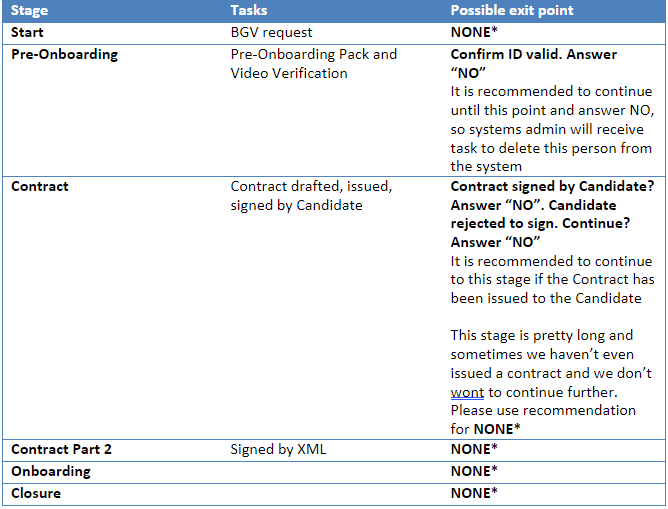


If there is no exit point, Octavian has to request Systems Admin manually via email to delete the Candidate from Cascade and it will stop/delete the process. Please remember to cancel Onboarding in JobDiva as well. 


Please note, when a contract is fully signed off, the Payroll Input Team will receive a copy, and Octavian must inform them that the process has stopped and request Contracts Management Team to issue “a letter of not joining/contract cancellation”.


Comments

N/A


    • Related Articles

    • Expense Claim - Extracting Information and Reports

      Information Related to Expense Reports For information regarding expenses, go to JobDiva and create an expense claims report. The invoice reporting produced by Finance may have more details in the description of the bill we send the clients to pay. ...
    • Onboarding Documents - Spanish

      Please see attachment for list of documents in Spanish required for the onboarding process.
    • Documents Required for Onboarding

      Please attached a guide for the required documents and how to upload them to JobDiva.
    • Onboarding Process - Frequently Asked Questions

      Please see attached a document with frequently asked questions with regards to the Onboarding Process.
    • Onboarding Process for US Employees

      Onboarding Process Onboarding Steps (to be followed by the Onboarding Team) 1. Client creation – Agiloft, Cascade (in JobDiva client will always be marked as Remundo) 2. New Starter creation in Cascade and initiate the onboarding workflow 3. Assign ...